Reports and Invoices
Part 1: Prepaying for Postage
Before any mail is sent through DFS, you'll need to set up a prepaid postage account - what we refer to as a Postage Escrow account. This account ensures that funds are available in advance, so your mailings go out without delay.
Once a job is completed and mailed, the actual postage amount used is withdrawn from this account.
For a detailed explanation of how the escrow account works, how to fund it, and how to monitor balances to reconcile transactions, please refer to the Postage Escrow Guide.
Part 2: Your Bills
You will receive 2 different kinds of bills: Postage Invoices and Service Invoices
- Postage Invoices reflect the actual postage amounts withdrawn from your Postage Escrow account. It’s important these are paid promptly to ensure your account remains funded for future mailings.
- Service Invoices cover the agreed-upon project costs — including things like printing, inserting, programming time, paper, and envelopes. There won’t be any surprises here, as all of these details were reviewed and finalized when you became a customer.
Invoices and Reconciliation
Now let’s take a quick look at what you can expect to see on your bill. We’ll give you a brief overview of your invoices, along with the supporting reports that break down and explain each charge.
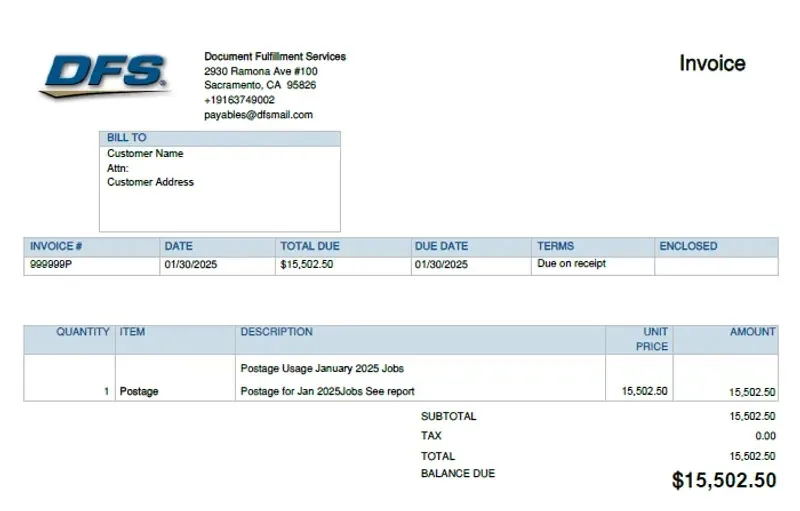
Postage Invoice
Your Postage Invoice reflects the total postage used during your billing period. In the example below, the billing period covers one full month.
Postage Summary Report
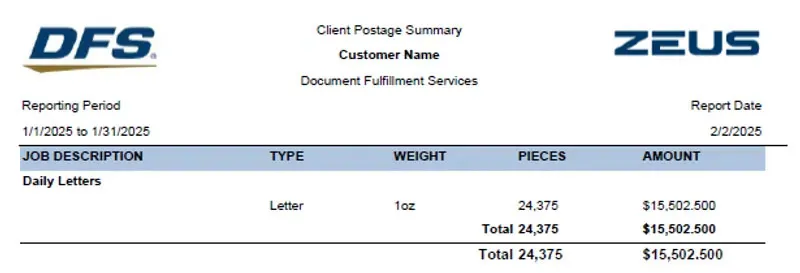
The Client Postage Summary Report sometimes called the Postage Summary Report provides a multi-page overview of the Total Postage used during your billing period. It breaks down postage usage by the different job types we receive from you.
In the example below, the customer has a single job called "Daily Letters".
This report shows both the dollar amount of postage used and the number of mail pieces sent, organized by each USPS Mailing Class.
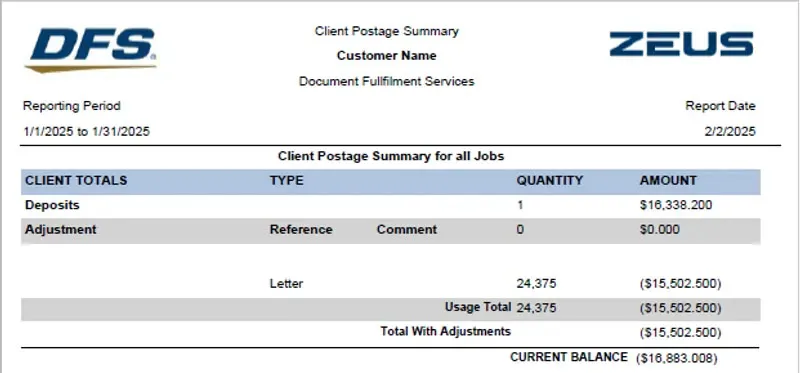
The second part of the Postage Summary report shows the funds deposited into your Postage Escrow account during the billing period, along with any adjustments that were made during that time.
Service Invoice
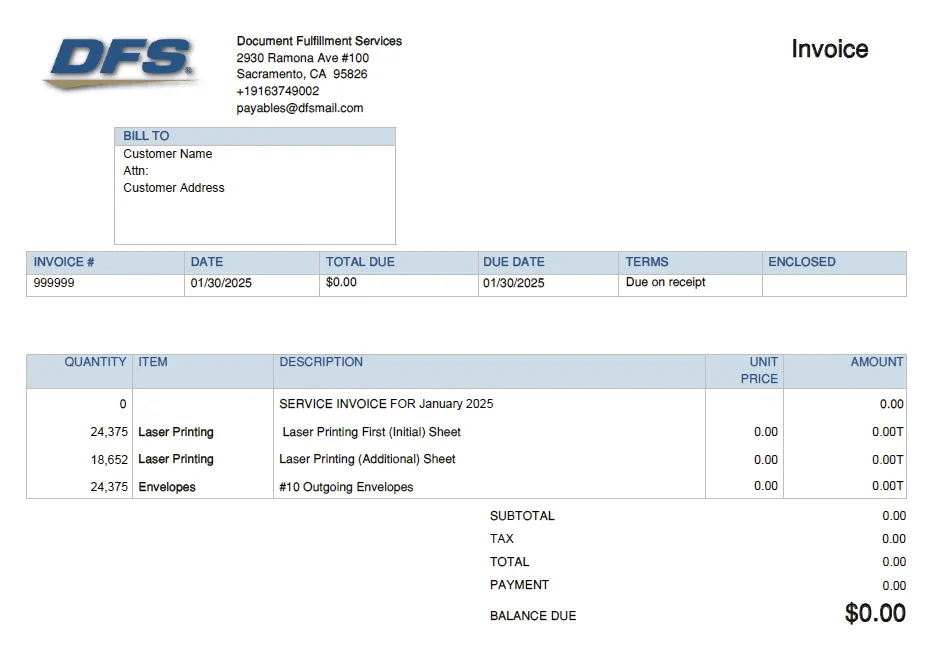
The Service Invoice includes charges for the services performed and any products used during your billing period. All pricing on this invoice reflects the terms outlined in your agreement with DFS.
In the example below, the agreement specifies one rate for printing the first image of each Mail Piece, and a different rate for any additional images. It also includes a fee per envelope. Since this is a sample, each line item is shown with a $0.00 charge for illustration purposes.
Work Order Billing Report
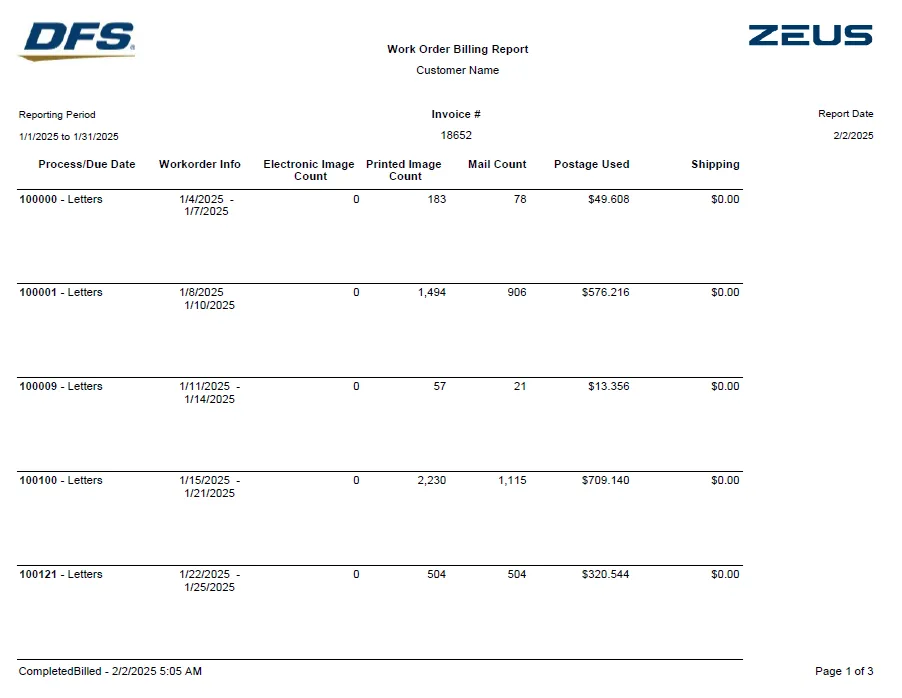
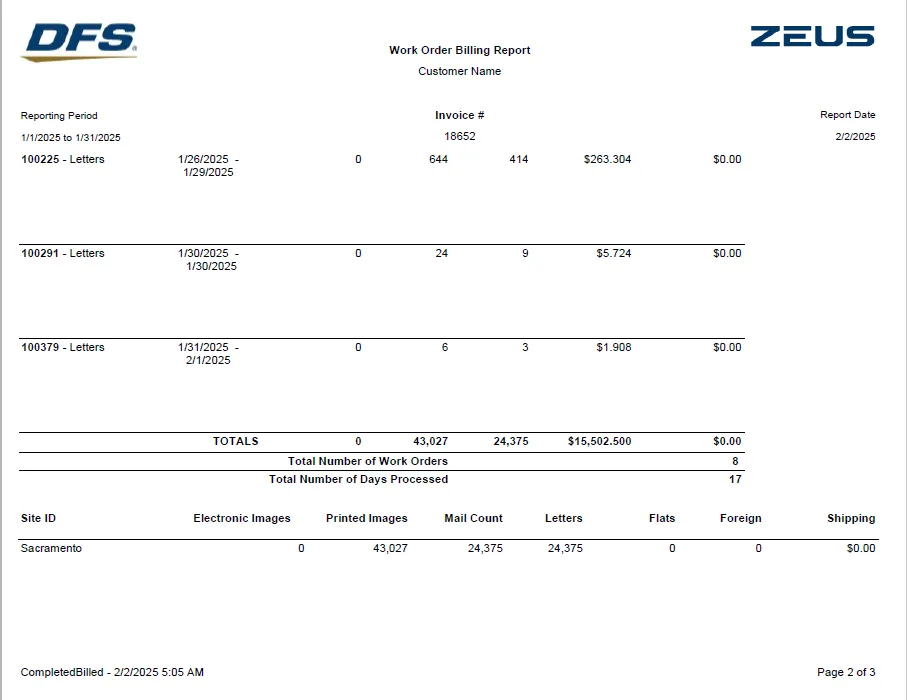
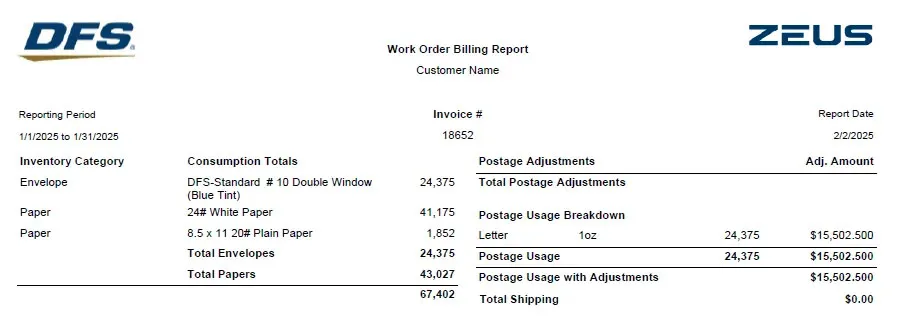
The Work Order Billing Report provides totals for a Service Invoice broken out by Work Order ID. It shows the number of images and mail pieces as well as the cost of postage and shipping. At the end of the report it lists a summary of the totals for envelopes and Paper for the entire billing period in addition to the Mail Piece and Image totals.
To verify or reconcile your Service invoice, you'll want to refer to the summary totals at the end of the report.
For example:
- The quantity for "Laser Printing First (Initial) Sheet" should match the "Mail Count" total since each piece of mail at least one initial sheet.
- We would then subtract the Total "Mail Count" from "Total Papers" to determine the quantity for "Laser Printing (Additional) sheets".
- The quantity for "#10 Outgoing Envelopes" is clearly listed where it says "DFS-Standard # 10 Double Window (Blue Tint)".
This is a basic overview of DFS Invoices and Reports. Account Services will provide you with answers to any questions you may have regarding the use of reports to verify charges specific to your agreement.